Prayer times, the qibla, and gentle prayer tracking.

Simple Prayer shows today's five prayers and counts down to the next one. When you pray, tap the round mark beside it — its seal — and the prayer is recorded. You can do that in the app, on your home screen, from a notification, or on your watch. It works offline, and it will never show you an ad.

  • No ads, ever
  • No account
  • No tracking
  • Works offline

Or use it in your browser Today’s times and the qibla, with nothing to install.

For iPhone and Android — phones, tablets, and watches. Out now on the App Store and on Google Play.

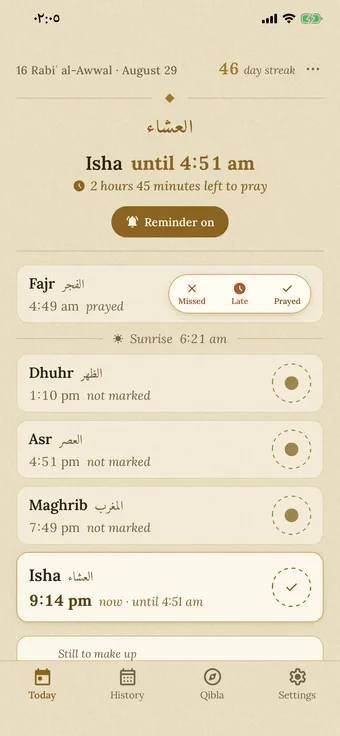
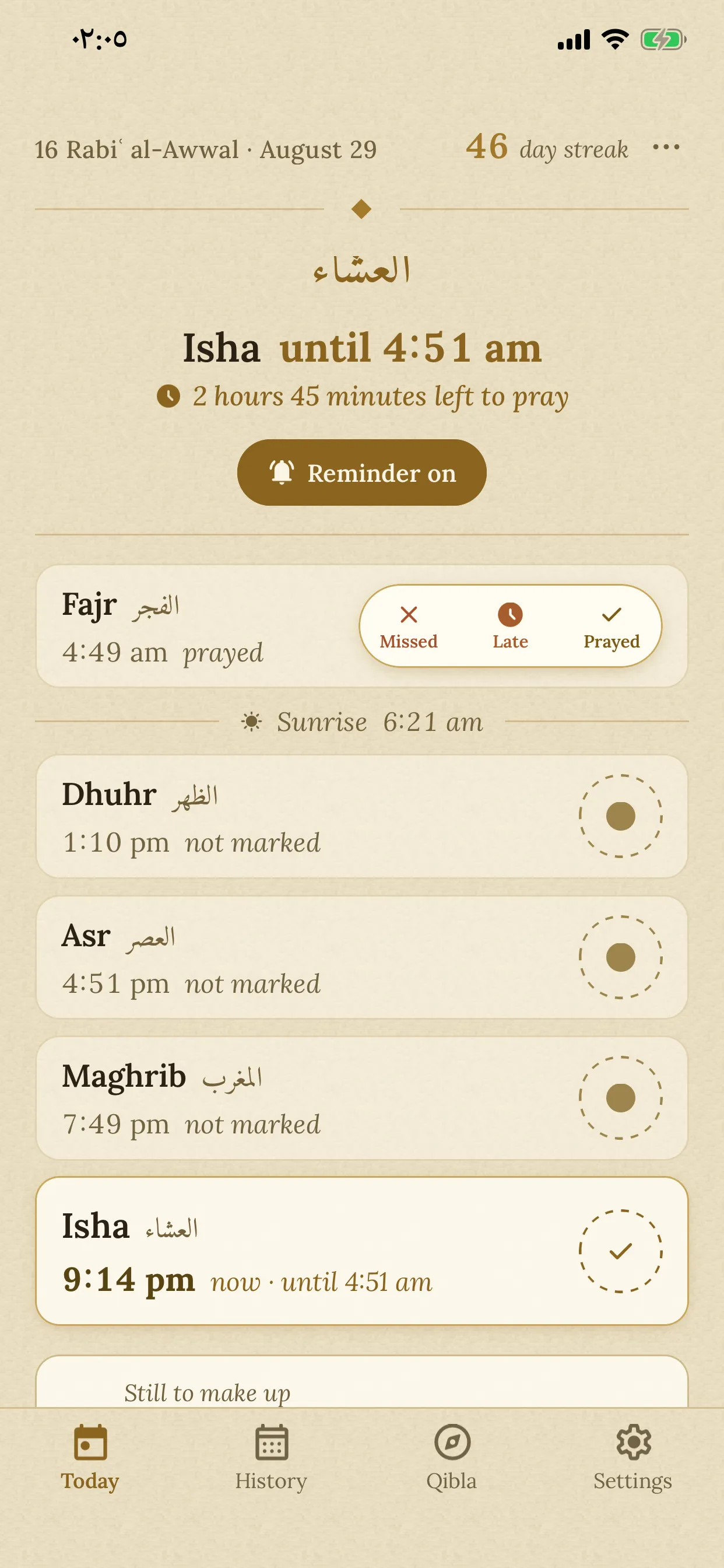
Simple Prayer's Today screen in the light paper theme: Hijri and Gregorian dates, the day streak, a live countdown to the next prayer, and the five prayer rows — with Fajr's seal open on its three choices.

Today's prayer times

Let your browser say where you are, or choose a city. The times are worked out on your device, and your location is not sent anywhere.

    1. Fajr
    2. Sunrise
    3. Dhuhr
    4. Asr
    5. Maghrib
    6. Isha

    The app does the rest: it reminds you before each prayer, and you can mark the ones you have prayed.

    City list from GeoNames.

    How it works

    How you mark a prayer

    Maghrib المغرب

    8:47 pm · not marked

    tap the seal to choose · tap again to close

    This works exactly like the real app. Try it: tap the seal, then pick an answer. Picking the same answer again clears it.

    1. See today's five prayers

      Today shows all five prayers. The prayer you are in is highlighted, with a countdown to the end of its time. The times are calculated on your phone, so you never need an internet connection.

    2. Mark it when you pray

      Tap a prayer’s seal and choose missed, late, or prayed. Prayed is the last choice, in the seal’s own place, so the answer you use most is right under your finger. Tap the same answer again to clear it.

    3. Check past days in History

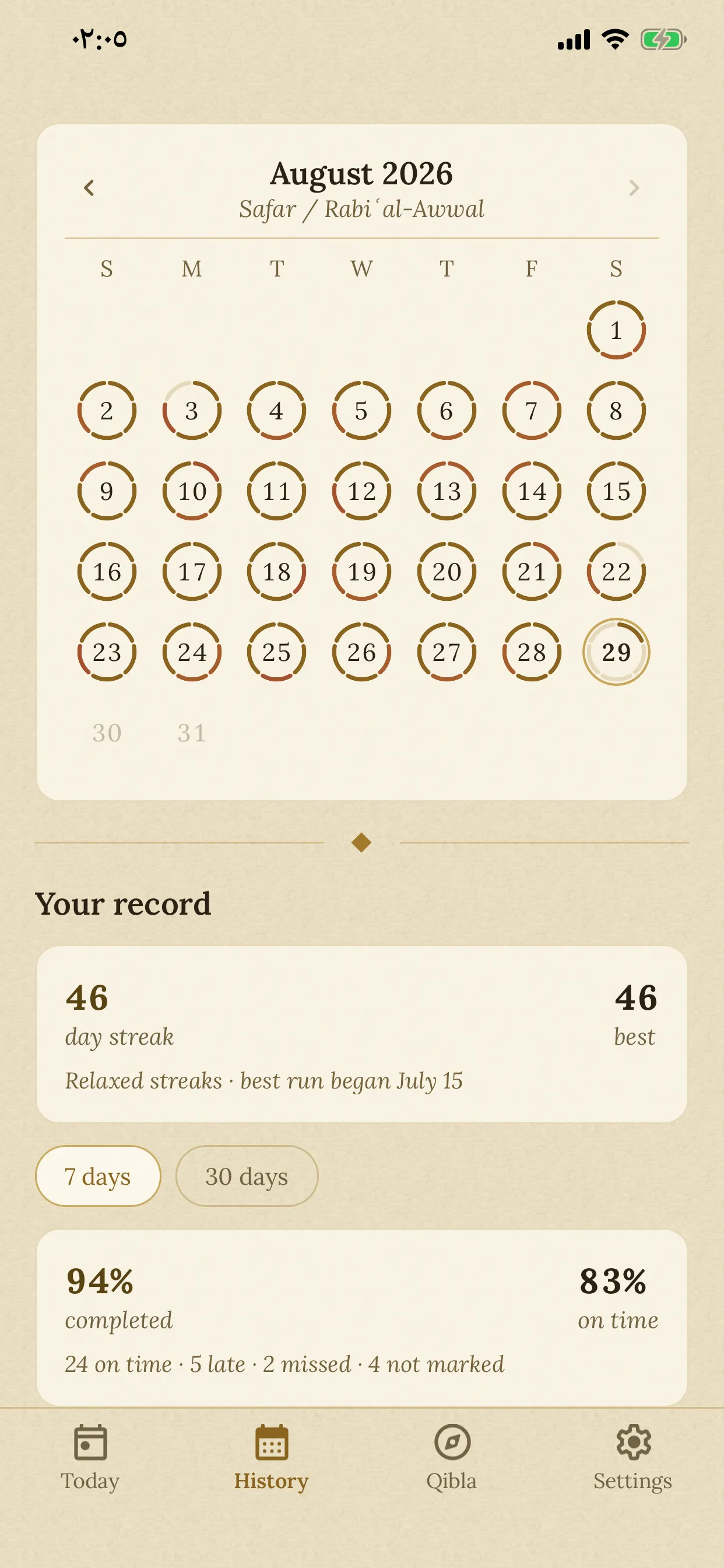
      History shows each day as a ring of five parts. Open any past day to look at it or change it. No day is ever locked.

    Features

    What's in the app

    Four tabs: Today, History, Qibla, and Settings. None of them ask you to create an account.

    The seal

    Tap the seal and it opens into three choices: missed, late, or prayed. Prayed sits exactly where the seal was, so the answer you use most is right under your finger. Pick one and the seal closes and turns gold. If you pick the wrong one, tap it again and choose another.

    The Today screen with a prayer's seal expanded into its three choices — Missed, Late, and Prayed, with Prayed last, in the seal's own place.

    The History tab

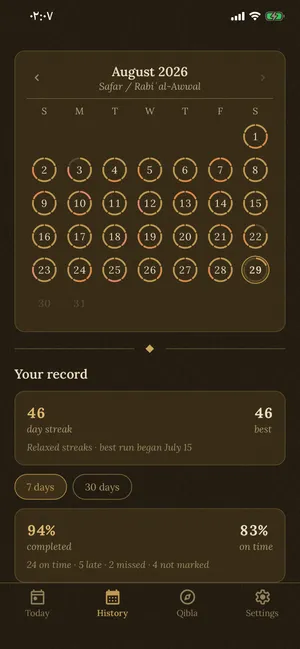
    Each day in History is a ring with five parts, one for each prayer. Under the calendar you can see your streak, how often you pray on time, and which prayer you miss most. Days you did not mark are kept separate from days you missed.

    The History tab: a month calendar where each day is a ring of five segments, above streak and completion statistics.

    The qibla compass

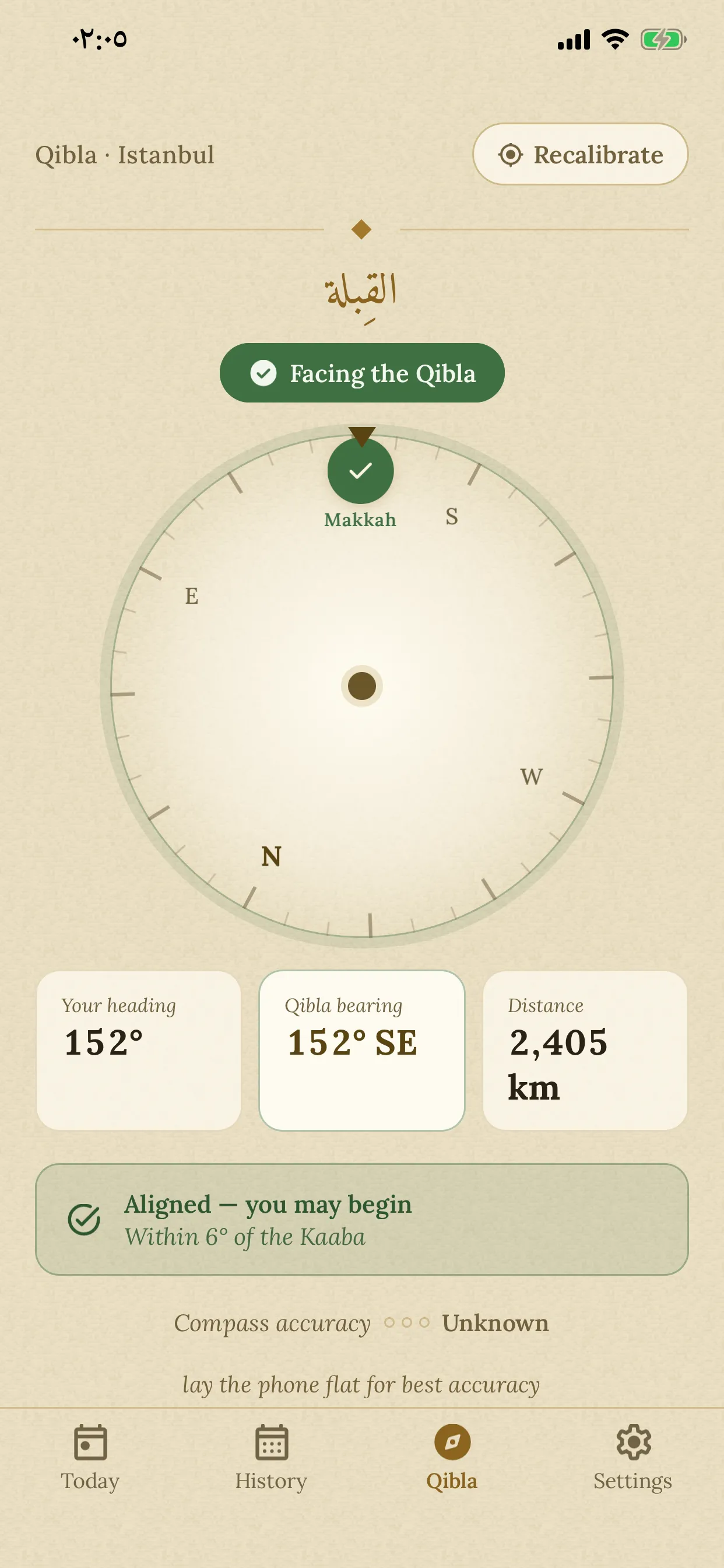
    The dial shows the Kaaba on its ring, and the instruction is written underneath: “Turn 38° to the left.” When you are facing the right way, the dial turns green and says so. A compass points at magnetic north, which is not quite the real north; the app corrects for the difference where you live. The needle stays steady while you turn, even if your hand is not. And unlike most prayer apps, it does not need the phone held flat: it notices how you are holding it and stays accurate anyway. It also tells you how sure it is, and shows you how to hold the phone for the steadiest reading.

    The Qibla compass aligned: the dial and Makkah badge turned green, with the message “Aligned — you may begin”.

    Missed prayers (qada)

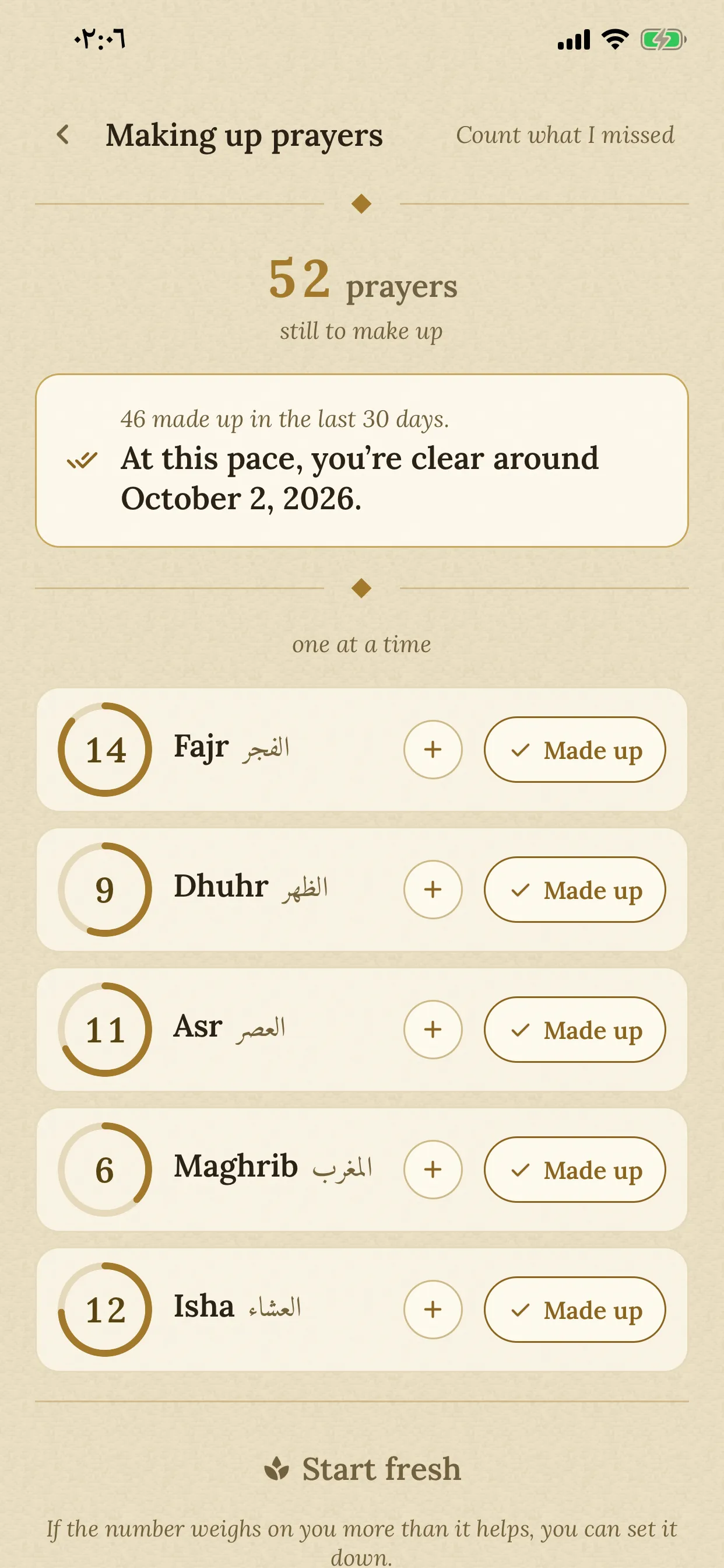
    When you mark a prayer as missed, the app adds it to a count for that prayer. The count goes down as you make the prayers up. The screen shows how fast you are going and the date you should be finished. You can also clear the whole count and start again, and you have 30 days to change your mind.

    The qada screen: descending per-prayer counters with progress, recent pace, and a projected debt-free date.

    Travel mode

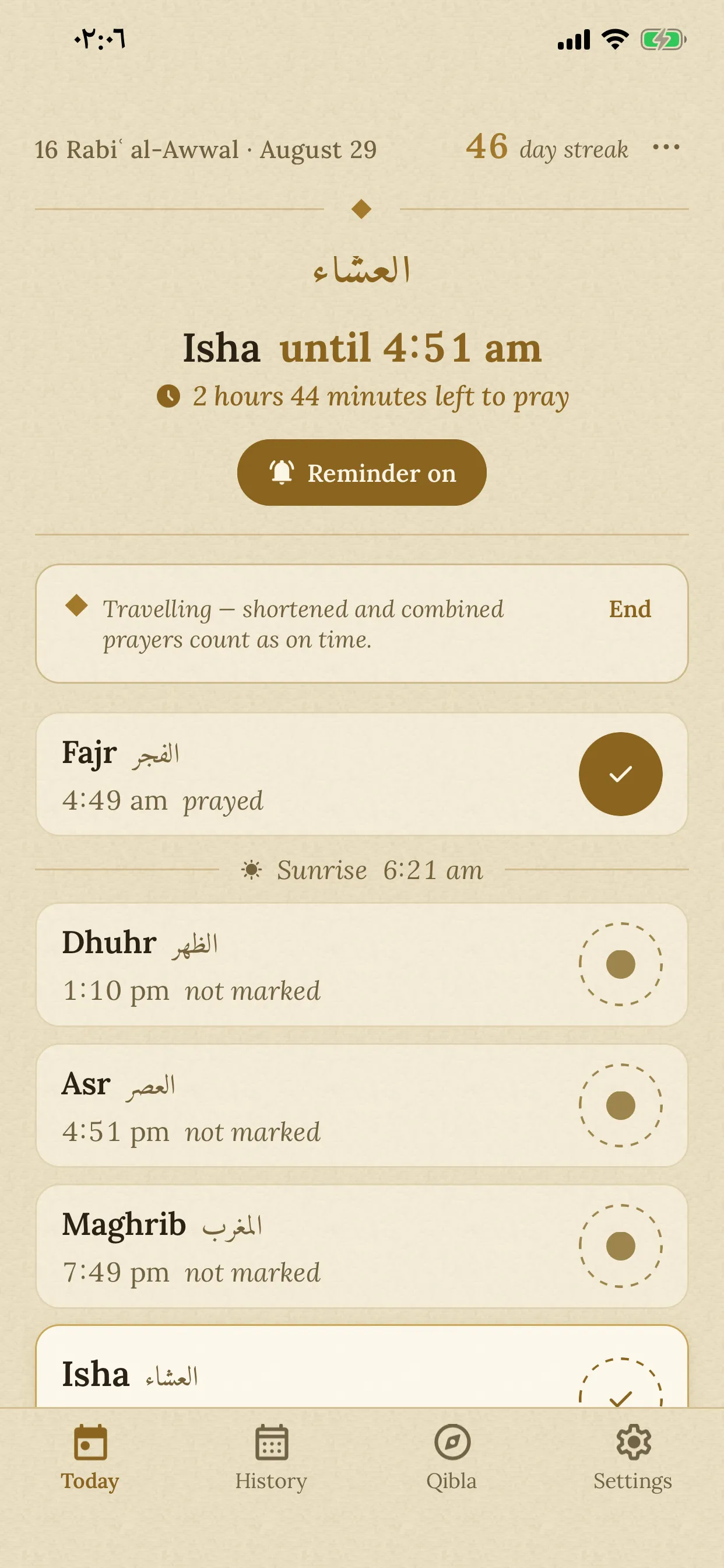
    When you are travelling, you may pray Dhuhr, Asr and Isha as two rakats. You may also pray Dhuhr together with Asr, or Maghrib together with Isha. Turn travel mode on from the menu at the top of the Today screen. The app then stops calling a joined prayer late. Prayer times do not change, and all five prayers are still yours to mark. You can set it for a number of days, and it ends by itself.

    The Today screen with travel mode on: a quiet banner under the countdown, saying prayers may be shortened and combined.

    How the times are calculated

    The app picks the calculation method used in your country, and always shows its name: Diyanet, ISNA, Umm al-Qura, Egyptian, Karachi, and others. You can change it yourself, choose Hanafi or Shafi Asr, and move each prayer by up to 30 minutes to match your mosque. Today shows the Hijri date beside the ordinary one, and on Friday the midday prayer carries both its names: Jumu’ah · Dhuhr. If you live far north, where the sun barely sets in summer, you can pick a rule for those months.

    Reminders

    Each prayer can have three reminders: one when its time comes in, an earlier one to help you wake up for Fajr, and a last one before its time runs out. Each can be silent, a simple tone, or the adhan — there are four recitations to choose from. If you have already marked the prayer, the last reminder is cancelled. A separate screen shows you exactly which reminders are set.

    Excused days

    For menstruation and the days after childbirth. On an excused day the app asks nothing from you: your streak keeps going, and nothing is shown as missed. No prayers need to be made up for those days. Reminders pause while it lasts — and if you would rather keep hearing the adhan, you can leave them on. Turn it on for as long as you need — until you end it, or for a number of days, and then it ends by itself. The app is not a period tracker and does not predict anything.

    Your data

    Your prayer log is stored on your phone and nowhere else. You can export it as a CSV or JSON file at any time. If you delete the app, the data is deleted with it.

    Prayer buddies

    Praying is easier when you know someone else is praying too. You can pair with someone you choose — a partner, a sibling, a friend — and see on today’s screen that they prayed, while they see the same about you. The point is to encourage each other. They never see a prayer you missed, or one you have not marked yet. There is no feed, no ranking and no score. It is off until you turn it on, and either of you can end it at any time.

    Everywhere

    You don’t have to open the app

    The times, and the tap that marks a prayer, are also on your home screen, your lock screen, your notifications, and your watch. They all work the same simple way. Whatever you mark lands in the app.

    Widgets on your home screen

    iPhone and Android

    On iPhone and Android, a widget shows today’s prayers or a countdown to the next one. The seal is on the widget: tap it, and the prayer is marked without opening the app.

    Your lock screen and StandBy

    iPhone only

    On iPhone, the next prayer can sit on your lock screen, and on the bedside StandBy screen at night. These show times only. Other people can see a lock screen, so what you track never appears there.

    The “I prayed” button on reminders

    iPhone and Android

    On Android, every reminder carries an “I prayed” button, and you can also keep an always-on notification in your shade showing the current and next prayer. On iPhone, press and hold the reminder and the same button appears. Either way the prayer is recorded without opening the app, and a short confirmation follows, with Undo.

    A countdown on your lock screen

    iPhone only

    On iPhone, open the app a little before a prayer and a card stays on your lock screen, counting down — with the seal right on it, so you can mark the prayer without unlocking. You choose how early it appears and how long it stays.

    Tablets and folding phones

    iPad and Android tablets

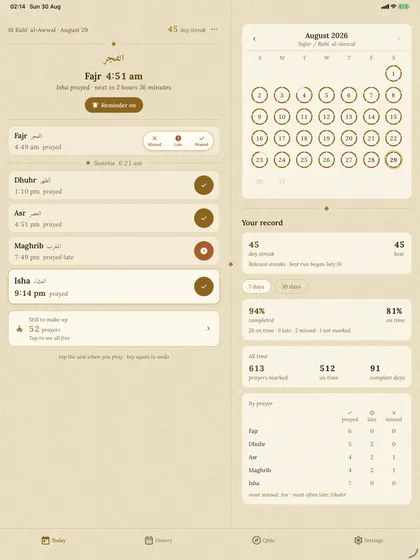
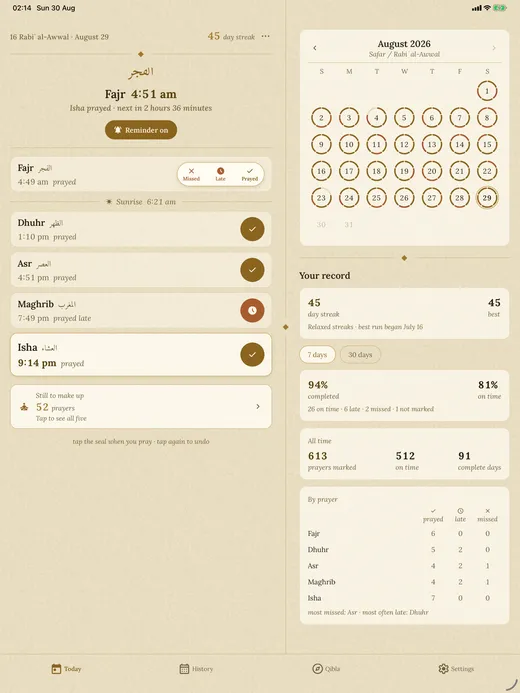
    On a tablet, or a folding phone opened flat, the screen splits in two: today’s prayers on one side, the month and a small qibla dial on the other.

    The watch

    On your wrist

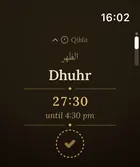
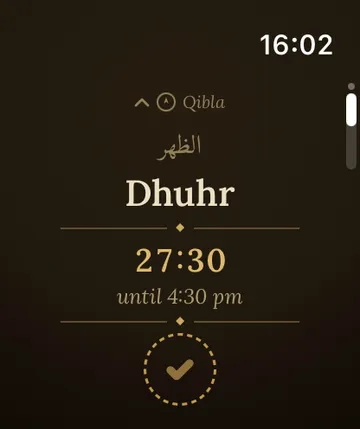
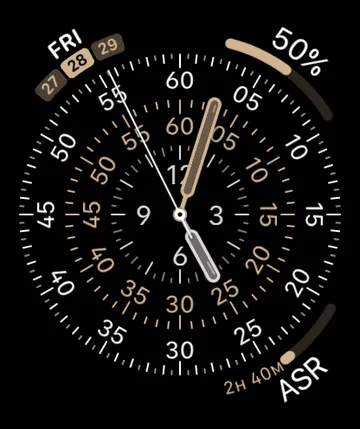
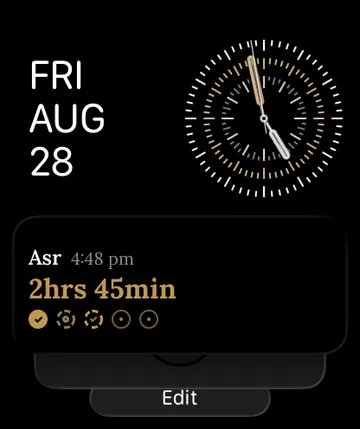
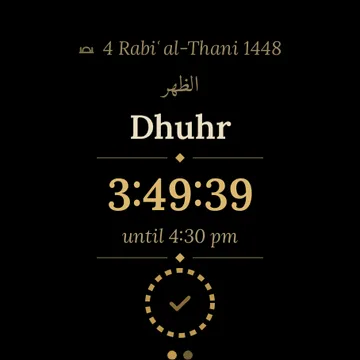
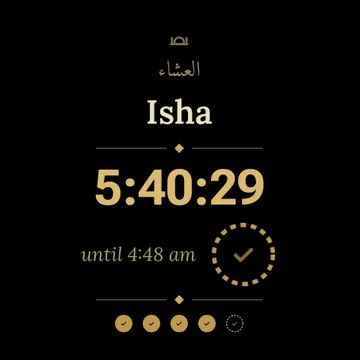
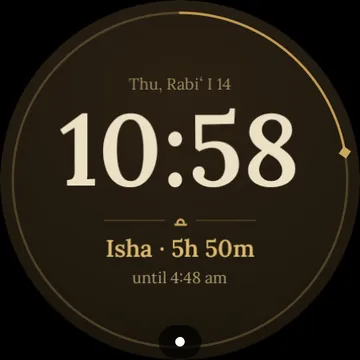
    The app is on your watch too: today’s prayers, the seal you tap once, and the qibla. On the watch face itself, a small dial shows the prayer you are in, and its ring fills as its time passes. Slide up from the face and a card counts down to the next prayer. Tap either one and the app opens. On Wear OS there is also a card one swipe from the face. A watch face of our own, called Manuscript, is coming soon. The watch keeps two weeks of times, so it stays right even when your phone is in another room — and when the phone is away, it can sound the adhan itself. A prayer you mark on the watch lands in the app.

    The app on Apple Watch
    The dial on your watch face
    The card under your watch face
    The app on Wear OS
    The Wear OS card
    The Manuscript watch face — coming soon

    slide for more

    If you miss a day

    When you mark a prayer, its seal turns gold, and the app counts the days you keep up. Missing one prayer does not always end your streak. In Relaxed mode, one prayer keeps the day. In Committed mode, you need all five. Excused days do not end a streak. A day you forgot to mark is never turned into a day you missed. You can open any past day and change it, so a wrong tap is easy to fix.

    There are no leaderboards, and the app never tells you that you broke your streak. It shows a small note at 3, 7, 30, 100, and 365 days. Nobody can see your log except you — unless you add a prayer buddy, and then they see that you prayed today, and nothing else.

    This section shows the app's dark theme. The app follows your phone's light or dark setting, and you can also pick one in Settings. This page works the same way. The switch is at the top of the page.

    The Today screen in the dark theme: the same layout on deep warm parchment with lit gold accents.

    You don’t have to track anything

    Many people only want the prayer times and the qibla. The app is built to do that well on its own. It never asks you to start marking prayers, and nothing looks unfinished if you never do.

    If you do mark your prayers, the app is here to encourage you, not to judge you. It does not grade you, and it is not trying to be a complete record of every prayer you have prayed.

    Made to be easy to read and easy to tap

    Many people who pray five times a day are older, or do not see well, or use a screen reader. The app is built for them too.

    The app comes in English, العربية, and Türkçe. Each translation is written by a person who knows the language, never by a machine. Arabic is fully right-to-left, in a font made for Arabic.

    • The buttons are large and easy to press, even if your hands are not steady.
    • If you use a screen reader like VoiceOver or TalkBack, every button and setting is read out by name.
    • You never need to tell colours apart. A prayed, a late, and a missed prayer each has its own icon and its own word.
    • If you make the text bigger in your phone's settings, the text in the app gets bigger too.
    • The app works before it asks you for anything. There is no sign-up. You can type your city instead of sharing your location, and the app will not keep asking.
    • In the dark theme, everything stays easy to read, even the smallest line of text.
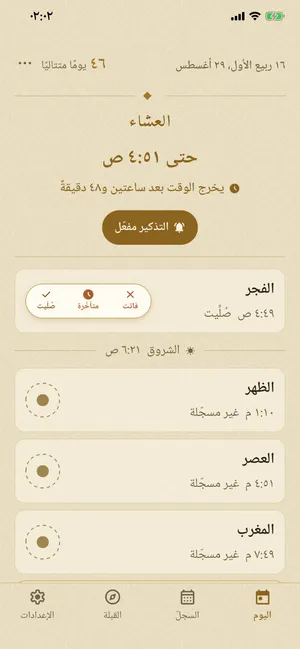
    The Today screen in Arabic: the entire interface mirrored right-to-left, in Arabic script.

    What we promise

    No ads, ever. No account. No tracking. Your prayer log stays on your phone. Your rough location is sent only to your phone's own map service, so it can name your city. If the app crashes, we get a report that says the app broke and nothing about who you are, and you can turn that off in Settings. The app is free and will stay free. If it helps you, you can leave a tip in Settings. That is the only money in it.

    The privacy policy says all of this in plain words, including the four cases where anything at all leaves your phone. This website keeps the same promise: no cookies, nothing that counts visitors, and nothing loaded from anyone else.

    Common questions

    Is it really free? How do you make money?

    The app is free, complete, and has no ads. If it helps you, there is an optional tip in Settings. That is the only money in it, and it unlocks nothing.

    Do I need an account?

    No. There is nothing to sign up for and no password to remember. You open the app and it works.

    Does it work without internet?

    Yes. Prayer times are calculated on your phone, so the times, the tracking, and the reminders all work offline.

    Will the times match my mosque?

    Usually, yes. The app starts with the calculation method your country uses, such as Diyanet or ISNA. If your mosque is different, you can change the method, choose Hanafi or Shafi Asr, and move any prayer by up to 30 minutes.

    Does it track me or sell my data?

    No. There are no ads, no analytics, and no account. Your prayer log stays on your phone, so there is nothing about you for anyone to sell.

    What happens on days I can't pray?

    Excused days are for menstruation and the days after childbirth. On those days the app asks nothing from you: nothing is shown as missed, and your streak continues. Reminders pause by default, and you can choose to keep them on. No prayers need to be made up for those days.

    What if I am travelling?

    Turn on travel mode and the app follows the traveller’s allowance: Dhuhr, Asr and Isha may be prayed as two rakats, and Dhuhr may be prayed with Asr, or Maghrib with Isha. A prayer you combine is not counted as late. These prayers are still owed and still marked — travelling is not the same as an excused day. You decide when travel mode starts and ends, and the app never watches where you are.

    Does it work on my watch?

    Yes. On Apple Watch the app shows today’s prayers, the one-tap seal, and the qibla, and the next prayer can sit on your watch face. On Wear OS there is the same app and a tile; a watch face of our own, called Manuscript, is coming soon. A prayer you mark on the watch is recorded in the app.

    Can I mark a prayer without opening the app?

    Yes, in three ways. Press “I prayed” on the reminder notification. Tap the seal on a home-screen widget. Or mark it on your watch. Each one records the prayer just as if you had opened the app.

    What is the tip for?

    It is a thank-you, nothing more. Every feature is free for everyone, tip or no tip.

    Longer answers, on reminders, qada, and exporting your data, are on the support page.
    “Guard the prayer.”

    Get Simple Prayer

    Free on iPhone and Android. Works offline, no account needed.

    Every feature is free · English · العربية · Türkçe